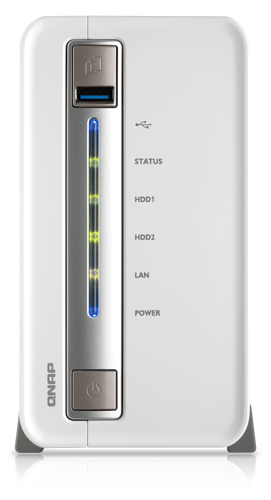
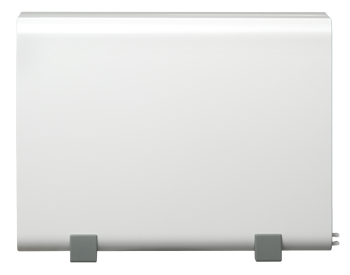
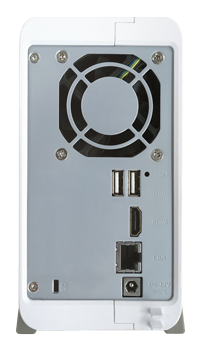
Overview:
The TS-251C provides a high performance & high capacity storage solution for SOHO & home, workgroup, and SMB users. Powered by the advanced QTS operating system, the TS-251C performs as an easy-to-use yet powerful NAS for data backup, file synchronization, remote access, home entertainment, and is ideal for users to build a personal cloud to access their data easily.
- Transcode Full HD videos on-the-fly or offline
- Play 1080p videos with 7.1 channel surround sound pass-through via HDMI output
- Create a personal cloud and stream your multimedia library via DLNA, AirPlay, and Plex
- Centralize your file storage, sharing and backup
- Run a virtual machine and extend the functionality of the NAS with an integrated virtualization solution
- Expand the total raw storage capacity up to 60TB (with maximum 10 hard drives) with the economical QNAP expansion enclosure UX-800P
High performance
Powered by a new 22nm 64-bit dual-core Intel® Celeron® 2.41GHz processor with 1GB energy-efficient DDR3L RAM (upgradable up to 8GB), coupled with the support of dual LAN ports and HDMI connectivity, the TS-251C is a powerful home NAS with supreme value and great performance to deliver up to 220MB/s read & write speeds. The TS-251C can also automatically increase the processor's clock rate from 2.41GHz to 2.58GHz when needed for CPU-intensive tasks. The TS-251C’s fast encryption and decryption performance provides transfer speeds of up to 68MB/s with AES-256 bit volume encryption, boosting system performance & security while ensuring the safety of sensitive personal data stored in the TS-251C. When installed with the latest dual-band 2.4GHz/5GHz 802.11ac Wi-Fi network card, the TS-251C can offer remarkably high speeds for transferring large amount of files and streaming bandwidth-consuming multimedia.
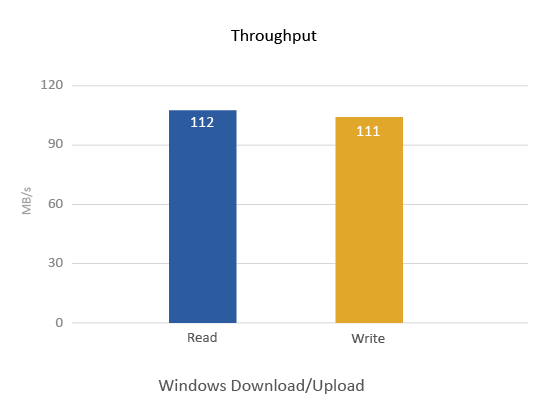
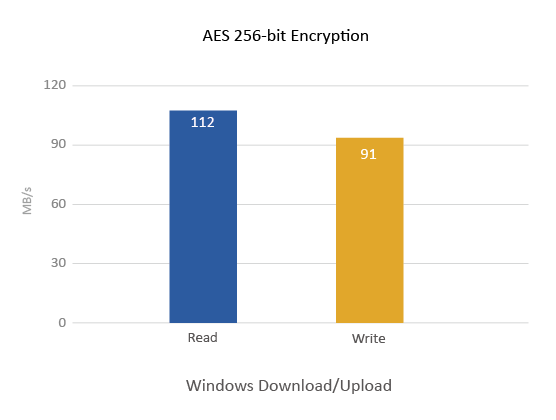
* Tested in QNAP lab. Figures could vary by environments.
QTS - Simple and efficient
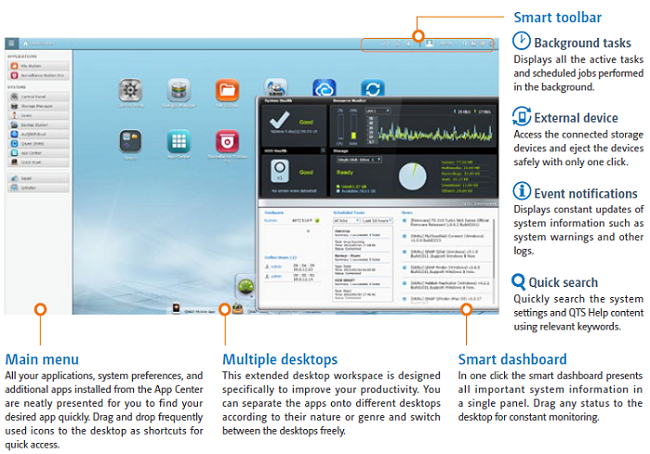
Thanks to the intuitive user interface of QTS, system operations of the TS-251C are smooth and handy. Its intelligent desktop allows you to find desired functions quickly, create desktop shortcuts or group shortcuts, monitor important system information on a real-time basis, and open multiple application windows to run multiple tasks concurrently, bringing greater operating efficiency.
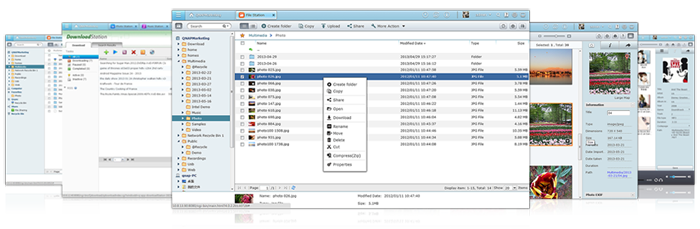
Easily build your personal cloud and access anywhere
QNAP’s myQNAPcloud provides an always-connected infrastructure for business and home users to build their private or personal cloud with ease. Through any web browser or the free mobile app the TS-251C becomes your personal cloud so you are always connected to your data. Take advantage of the myQNAPcloud service, which allows you to remotely access your TS-251C wherever you are. Instantly stream or share your multimedia contents and share them with your friends.

Real-time & offline HD video transcoding
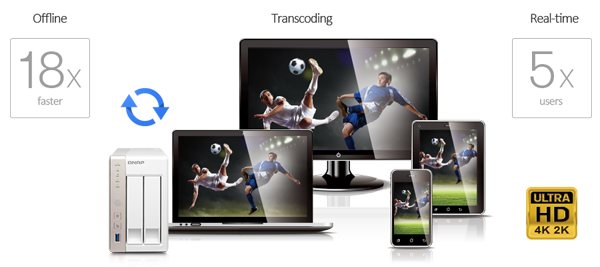
The TS-251C delivers superior real-time Full HD video transcoding to convert your videos to formats that can be smoothly played on PCs, mobile devices and Smart TVs. It allows for up to 5 devices to simultaneously view different videos stored on the TS-251C with on-the-fly hardware accelerated transcoding. The TS-251C allows you to enjoy instant videos on multiple devices - even those that lack computing power or have limited file format support - without the need for complicated and time-consuming file conversion.
With the benefit of offline transcoding, if you can only connect to an Internet connection with limited/restricted bandwidth, you can still enjoy smooth videos by selecting a pre-rendered lower resolution to play the videos via File Station, Video Station, or the Qfile app for iOS & Android without affecting the TS-251C’s performance running other applications. This also allows more people to play videos via streaming. The TS-251C also allows you to set a dedicated folder for automatic video transcoding.
 Stream media via DLNA, AirPlay, and Plex
You can use DLNA-compatible devices such as HDTVs, Smart TVs, Sony® PS3, Microsoft® Xbox 360 and Hi-Fi systems to enjoy HD quality videos and high-resolution audio content such as DSD (Direct Stream Digital) audio format stored on the TS-251C. You can also use the Qfile app on an iOS device to browse videos and photos stored on the TS-251C and play on the TV via Apple TV. By installing the QAirplay app, available on the QTS App Center, you can stream your media content directly on a TV via Apple TV. The media contents are streaming on Apple TV, bypassing your mobile device, thus saving the energy of your mobile device. The TS-251C's support for Plex Media Server organizes all of your media with rich information and transforms the TS-251C into a powerful & easy to use streaming machine with DLNA, Roku, Amazon Fire TV, and Google TV support.
Full HD videos local display with HD Station via HDMI
QNAP HD Station integrates the powerful XBMC v12 media player and web browser. With HDMI 1.4a connectivity, you can connect the TS-853 Pro to a HDTV to enjoy your multimedia on the big screen. The splendid user interface and support for 7.1-surround sound passthrough* brings smooth playback of Full HD 1080p videos**. You can even watch YouTube videos, surf the web and manage the Turbo NAS using Google Chrome web browser with the HD Station.
It’s convenient & easy to control the HD Station. Turn your mobile devices into remote controls by installing the Qremote app, or use the QNAP RM-IR002 remote control and MCE remote controls via the built-in IR receiver of the TS-853 Pro. The HD Station also supports YouTube Pairing, allowing you to select a YouTube video on your smartphone, tablet or computer and play it on HDTV via the TS-853 Pro.
*A receiver with HDMI support is required for decoding multi-channel surround sound.
** The quality of video and music delivery can vary according to hardware and network environments.
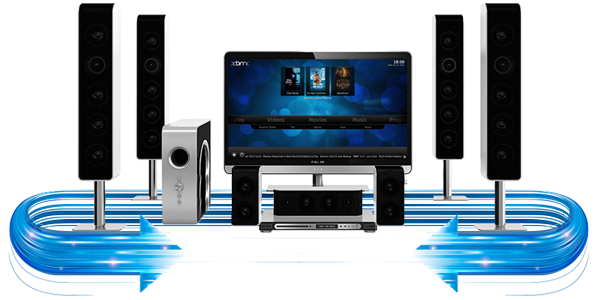
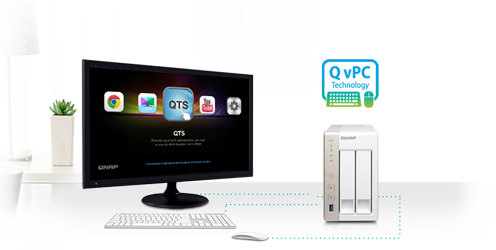
Use your TS-251C as a PC with the exclusive QvPC Technology
QNAP's exclusive QvPC Technology consolidates a number of high-end technologies including VM integration, multimedia transcoding, HDMI output, cloud integration and NAS connection technologies, allowing users to operate the TS-251C as a PC when they plug in a keyboard, mouse and monitor. With QvPC Technology, the TS-251C is transformed into a cost-effective device with PC functionalities for users to directly access stored data, run multiple applications using Windows/Linux/UNIX/Android-based VMs, surf the web on Google Chrome, enjoy Full HD videos with up to 7.1 channel audio with XBMC, monitor Surveillance Station in real time with local display, and much more.
Extend the functionality of the TS-251C with Virtualization
Introducing the world’s first consumer-grade NAS with integrated virtualization technology. The Virtualization Station transforms the TS-251C into a 2-in-a-box NAS that can function as an all-in-one NAS and a virtualization platform supporting multiple operating systems, fast virtual machine creation, virtual machine import/export, snapshot, and enables desktop operations on web browsers. With the easy-to-use interface, you can centrally manage all of the virtual machines created on the TS-251C with minimal effort. You can also download VMs on demand from online VM markets and import them to TS-251C without any complex procedure.
Note: The Virtualization Station requires at least 2GB RAM to operate. Multiple VMs can be installed, but only 1 VM can be run at a time. TS-251C with 4GB RAM (Ordering part no. TS-251C-4G) is available for ordering and recommended.
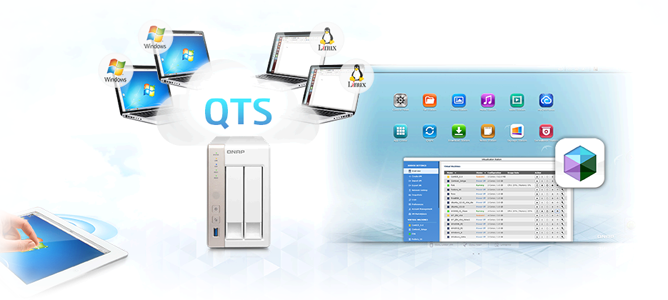
Cross-platform file sharing, centralized data storage
The TS-251C supports SMB/CIFS, NFS, and AFP protocols for file sharing across Windows, Mac and Linux/UNIX. Data, logs and ISO image of CDs and DVDs can be centrally stored in the TS-251C and protected by an integrated antivirus solution.

Well-rounded backup solutions to secure data
QNAP NetBak Replicator supports real-time and scheduled data backup on Windows including Outlook email archiving. Apple Time Machine is also supported to provide Mac OS X users with a solution to effortlessly back up data to the TS-251C. The USB 3.0 port on the front panel of the TS-251C features a one-touch-copy function for you to instantly back up data on external drives to the TS-251C with just one click, or alternatively to back up data from the TS-251C to external drives. A wide range of third-party backup software such as Acronis® True Image and Symantec Backup Exec are also supported.

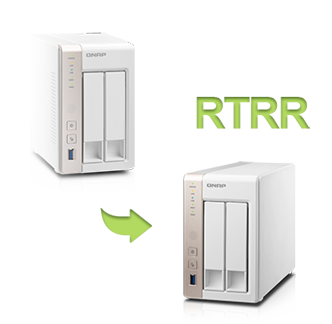 Disaster recovery solutions bring peace of mind
The TS-251C offers various data recovery options. RTRR (Real-Time Remote Replication) supports real time and scheduled data backup to remote Turbo NAS or FTP servers and synchronizes files to remote folders from local folders with better backup efficiency and reduced backup time. The TS-251C also supports rsync protocol to back up data to remote servers on a scheduled basis. Data can also be backed up to and restored from a range of cloud storage services, including Amazon® S3, Amazon Glacier, Microsoft® Azure, ElephantDrive®, Dropbox® and Google® Drive.
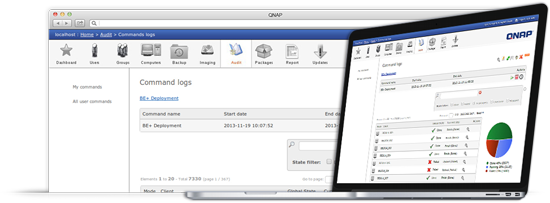
Optimize home computer management with the IT Management Station
The IT Management Station, powered by Mandriva® Pulse, provides a flexible service for managing your home computers. By installing the IT Management Station on the TS-251C, you can easily manage multiple family computers with different operating systems, effortlessly handle backup & restore jobs to protect your precious data, and centrally install & update software on multiple computers with greater efficiency.
Archive your photo memories. Share your life.
The TS-251C acts as your photo vault for you to back up your favorite photos. The Photo Station makes photo sharing simple, and you can designate your own access right controls. Simply upload your photos to the TS-251C to create & organize your photo albums through a web browser, and share with your family and friends through social networking sites such as Facebook, Google+, Twitter and Pinterest. Your mobile devices are useful too, with the Qfile mobile app in your iOS® or Android™ devices you can instantly upload photos to the TS-251C.

Build your home music library and enjoy music anywhere
The Music Station helps categorize your music collection, and displays album covers to easily organize your personal playlists. Through the music station web player, you can enjoy your music anytime, anywhere with a few clicks. Thousands of local and global online Internet radio programs are also built-into the Music Station for you to enjoy.
- Stream music and high-resolution audio (DSD) content to your DLNA Hi-Fi system and indulge in a high-quality sound experience.
- Stream music via AirPlay to compatible devices.
- Listen to your favorite songs streamed from iTunes Server, or play music via web browsers on your PC.
- Listen to your music on mobile devices through the Qmusic app.

24/7 download center
The TS-251C is a perfect download center for high speed BT, Magnet, PT (Private Trackers), eMule, FTP, and HTTP downloads. After the download tasks are set ready, you can turn off the computer, and the TS-251C will download as many HD videos as you want. With the QGet utility you can manage your download tasks on multiple Turbo NAS devices remotely on the local network or the Internet. You can also install HappyGet app to back up abundant online videos to your TS-251C.
Dropbox-like file synchronization across computers and mobile devices
With Qsync, your TS-251C is turned into a safe data center for file synchronization. Any file uploaded to the TS-251C will be made available for all linked devices, such as computers, laptops and mobile devices. Qsync is especially useful for frequent travelers in managing files and ensuring that different devices have the most up-to-date files. Qsync provides multiple ways for file synchronization and group file sharing, greatly enhancing the flexibility of team projects and collaboration.

Comprehensive surveillance solution with 24/7 security
The TS-251C’s Surveillance Station offers a professional surveillance solution with a user-friendly management interface, a wide range of over 2,600 compatible IP camera models, and expandable IP camera channel licenses. It supports real-time monitoring, video & audio recording and playback with a wide range of customizable settings. You can also install the VMobile app on your iOS® or Android™ devices to manage the monitoring of cameras anytime, anywhere, for total surveillance of your monitored environment.
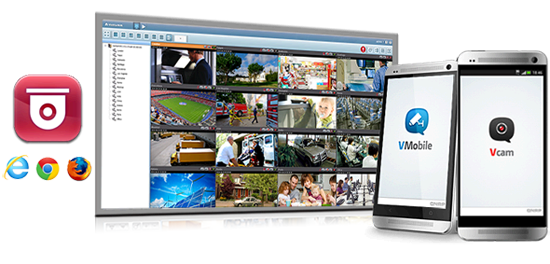
Signage Station - Creatively present your animated content and ads
With the Signage Station, it’s easy to create content for a wide range of materials such as personal animated resumes or life memory books. The Signage Station is a great tool to bring your resume to life with rich media content to creatively present your background and accomplishments. You can also create personal memory books to edit and record each life event. The iArtist Lite application, with intuitive editing tools, helps you to easily create these signs with drag & drop tools. Your creativity can now travel around the world with a few simple steps.

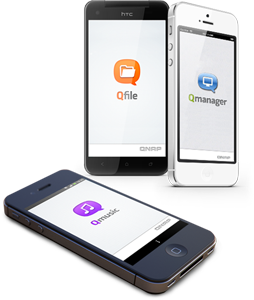 Access, use, sync and enjoy with your tablets and smartphones
The TS-251C is your private cloud storage that virtually enlarges the capacity of your smart mobile devices. Qfile allows you to access, upload, download, manage, and share stored files easily as if you are carrying tons of files in your pocket. If Qfile is installed on an iOS device, users can also browse videos & photos stored on the TS-251C and play on a TV via Apple TV. Qmanager lets you monitor & manage the TS-251C remotely and efficiently without turning on a PC, while Qmusic allows you to listen to your music collections on the TS-251C anytime and anywhere, and download to enjoy offline.
A private space for work & sharing
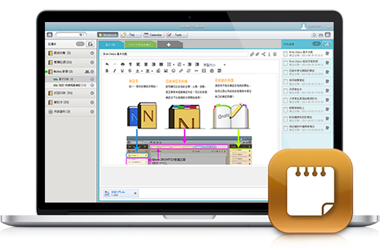
Notes Station
The Notes Station provides a private & secure way to share and collaborate on digital notes. With just a few steps it’s easy to create notes from web pages (or by importing from the TS-251C), edit notes with the intuitive web-based editor, and even create to-do lists & calendar alerts.
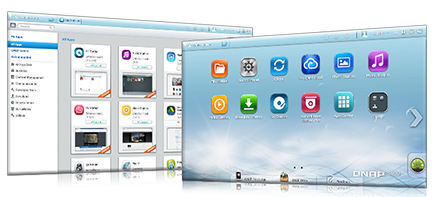
Install-on-demand apps to extend NAS functionality
The TS-251C has a built-in App Center that provides various install-on-demand apps developed by QNAP and third-party developers, including tools for backup/sync, business, content management, communications, download, entertainment, and much more. It is also a centralized location for managing & updating installed apps. In addition, QNAP’s development platform embraces the open-source spirit to enable developers to create their own apps, adding potentially limitless potential for the TS-251C.
Economical storage expansion with scale-up solution
The TS-251C offers a high performance yet affordable storage solution to fulfill the needs of small/home offices in archiving rapidly growing data & large files. The TS-251C supports online capacity expansion by connecting a QNAP expansion enclosure. With the QNAP scale-up solution, the raw storage capacity can be expanded on demand, making the TS-251C an ideal file center with large storage capacity for personal video collections. When connecting the TS-251C to a UX-series expansion enclosure you will have to create a separate volume, and the total usable storage capacity is the volume on the TS-251C plus the volume on the UX-series expansion enclosure.
The maximum raw storage capacity available by connecting a QNAP expansion enclosure:
*The maximum capacity is calculated by using 6TB HDDs.
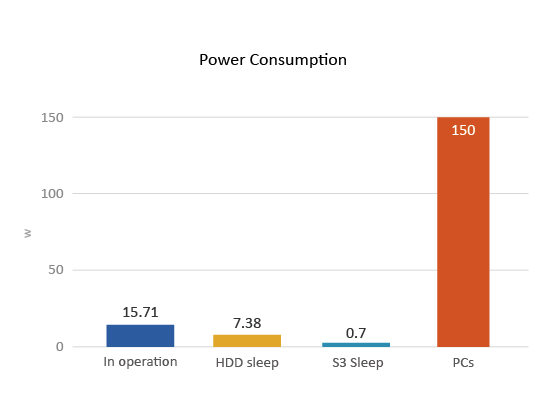 Energy-saving
The TS-251C utilizes a 22nm CPU and DDR3L RAM which feature low voltage, low power consumption, maintaining high performance in system operations with the benefit of energy-saving. Other eco-friendly designs include S3 sleep mode, HDD standby, scheduled power on/off, hard disk standby mode, and Wake on LAN.
The optimal storage solution for your smart home
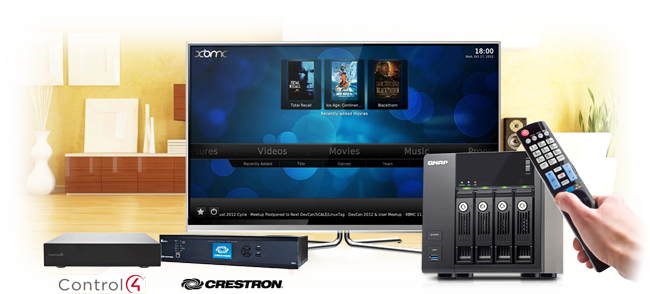
Are you tired of multiple remote controls on your table and messy wires coming from multiple devices? QNAP Turbo NAS is now compatible with industry leading home automation systems such as Control4 and Crestron. You can easily navigate the built-in XBMC media player on your Turbo NAS along with live monitoring from your VioStor NVR through one remote controller or pad. QNAP makes combining your network storage with your existing home automation system more easy than ever. With the integration of a QNAP Turbo NAS with a variety of popular controller systems, you can enjoy your movies and monitor your home in a few simple clicks, allowing a simple way to enjoy the convenience of home automation.
NAS management can be just that easy.
The TS-251C provides comprehensive system tools to increase management efficiency.
 |
 |
 |
Instant Alert Notifications
With the SMTP and SMS settings on the Turbo NAS, system administrators will get notifications from SMS or emails when any error occurs. |
SNMP (Simple Network Management Protocol)
After activate SNMP, you can collect system information, alerts and error messages on the Turbo NAS. All the information can be transfer to up to 3 SNMP servers to achieve real-time and central management. |
Wake on LAN
Administrators can turn on the Turbo NAS within LAN. It saves more energy and improve security. |
 |
 |
 |
Scheduled Power on/off
Administrators can flexibly set up the time of turning on/off for the Turbo NAS, maximum 15 sets of schedules are allowed for turning on, off, or rebooting. |
S.M.A.R.T. & Advanced Hard Drive Health Scan (HHS)
The Turbo NAS supports HDD S.M.A.R.T. (Self-Monitoring Analysis and Reporting Technology) which monitors the hard drive status, and sends out alert notifications through email for administrators to take precautions. Moreover, the HHD Health Scanning technology can examine the hard drive status and prevent possible data loss. |
Comprehensive Event Logs
The Turbo NAS supports Syslog server that collects logs from various connected devices over the Internet and saves the data, enabling centralized log management with greater efficiency. |
Additional features for home offices
The TS-251C supports various applications for home offices as an all-in-one Turbo NAS with cost-efficiency.
 |
 |
 |
FTP Server
The Turbo NAS supports FTP server to share large size files, coming with user-defined settings including bandwidth limitation, number of connections, and write-only permission. |
Web Server
The Turbo NAS supports Web server which allows numerous websites built on the same server conveniently. Administrators can manage up to 32 websites on the single one Turbo NAS with reduced IT cost. |
Home Automation
The Turbo NAS supports FTP server to share large size files, coming with user-defined settings including bandwidth limitation, number of connections, and write-only permission. |
 |
 |
 |
VPN Server
The Turbo NAS supports VPN server which provides an easy way for IT administrators to build up a secure private network and allows the staff to log on from outside the office and access business resources securely such as files and Internet connections. |
Print Server
The Turbo NAS can be used as a Printer server to send remote printing request via the Internet (max. 3 USB printers), and supports IPP (Internet Printing Protocol), Samba, print job management and Bonjour printing for Mac OS X. |
Plex Media Server
The TS-251C can be used as a Plex Media Server to stream your content to any Smart TV or Plex clients, including smartphones and tablets. |
Features:
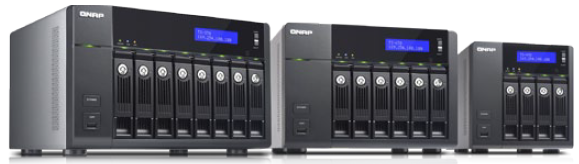
Modern businesses face the challenge of dramatic digital data growth. Deploying a reliable, affordable, and expandable storage center to securely store, share, and back up digital assets has become an important task for IT administrators. QNAP Turbo NAS provides an efficient and flexible network attached storage solution with the multi-window and multitasking QTS 4.0 Turbo NAS operating system. The TS-x70 series delivers a high-performing storage storage solution with 4 GbE ports and optional 10GbE network expansion for superior performance. QNAP provides powerful utilities and mobile apps which help business users to easily build up private cloud storage for data access, sharing, synchronization, and backup anywhere, anytime via the Internet. With VMware® Ready™ and Citrix® Ready™ certifications, and proven compatibility with Microsoft® Hyper-V™ environments, the Turbo NAS is an ideal shared storage solution in a virtualized and clustered environment. Furthermore, the smart NAS offers built-in App Center with over 90 apps for even more applications in various industries.
QNAP QTS 4.0
Intuitive, innovative operating system featuring synchronization capabilities, multiwindow and easy management.
Innovative Desktop
The QTS 4.0’s intelligent desktop offers an intuitive, sleek, and easy-to-follow graphical user interface, simplifying the whole Turbo NAS experience. It allows you to open multiple application windows and run multiple tasks simultaneously. Application windows can be minimized to the toolbar which allows you to see an overview of the opened applications and switch among the running applications.
Centralized Storage and File Sharing
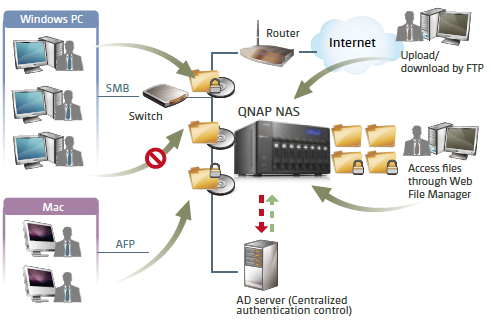
Cross-platform Sharing
The Turbo NAS supports SMB/CIFS, AFP, and NFS protocols for file sharing across Windows, Mac, or Linux/UNIX networks. User accounts and shared folders can be created via the user-friendly web-based interface without IT expertise.
File Station
Upload, download and manage files anywhere with a web browser. File extraction, folder creation, smart search files or folders are accessed over the Internet. Preview your photos and videos through any web browser too!
Windows ACL
Basic permissions and 13 advanced permissions can be set up from the Windows Explorer and synchronized with the permission settings of the Turbo NAS. In addition, the same permissions can be applied to AFP, FTP, Web File Manager, and Microsoft Networking when Advanced Folder Permissions are enabled at the same time.
Advanced Folder Permissions
Advanced folder permissions allow users to configure folder and subfolder access to the Turbo NAS. Users can manage the folder permissions from the web-based management interface of the Turbo NAS easily.
Windows Active Directory (AD) and LDAP Directory Service
Retrieve multiple user accounts from a Windows AD server or an LDAP directory server by the Turbo NAS for efficient account setup.
Well-rounded Backup Solution
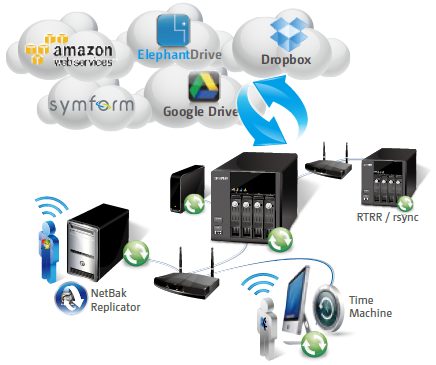
Client Backup
The QNAP Turbo NAS supports NetBak Replicator, Time Machine and more third party backup software.
External Backup
QNAP Turbo NAS comes with a “one touch data copy button” for direct data backup between the Turbo NAS and external USB/eSATA storage devices.
Remote Backup
- Back up the Turbo NAS data to another remote Turbo NAS or an FTP server on a real-time basis via QNAP’s Real-time Remote Replication (RTRR) service.
- Back up the Turbo NAS data to a standard rsync server on scheduled basis via the rsync protocol.
Cloud Backup
- Real-time data backup from the Turbo NAS to online cloud storage services: Amazon S3, ElephantDrive, Symform, Dropbox, or Google Drive.
Video Editing
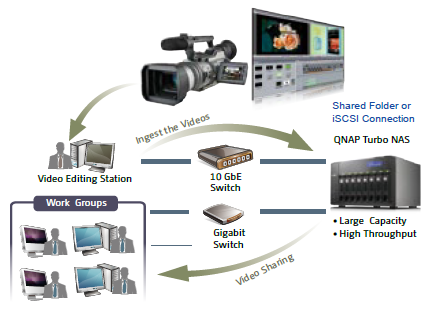
Digital film and video production produces volumes of data that require high performance RAID storage with sustainable throughput to balance with the demanding output of video editing. The QNAP TSx70 Series Turbo NAS fulfills storage and video editing needs with optional high-speed 10 GbE network interface. Digital videos can be quickly stored and edited on the Turbo NAS directly over the network. The Turbo NAS supports various network file sharing protocols such as NFS, AFP, and SMB/CIFS, so sharing files among PCs with different operating systems is easy.
Superior Performance
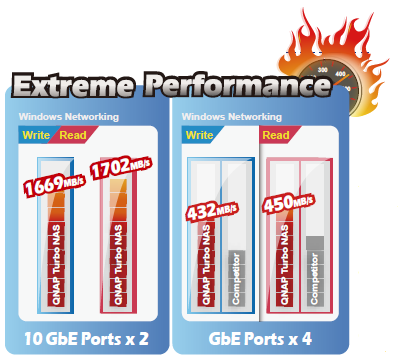
Testing Environment:
2 Client PC configurations: Intel®Core™ i7-2600 CPU, 16GB DDR3 RAM, Windows 7 professional 64-bit, Dual-port QNAP LAN-10G2T 10GBASE-T network expansion module, IOMeter sequential read and write.
NAS Configurations:
QNAP LAN-10G2D 10G2T 10GBASE-T network expansion module, 802.3ad trunking mode, full load Samsung HD103SJ 1TB SATA HDD, RAID 5.
Network Configurations:
Connect TS-870 and two client PCs to Cisco 4900M 10GbE switch.
10GbE Storage Solution
The QNAP TS-x70 Series Turbo NAS includes 4 GbE ports for industry-leading performance in business environments. The optional dual-port 10GbE adaptor support makes it ready for the high-speed data transfer craved by data centers.
Private Cloud Storage
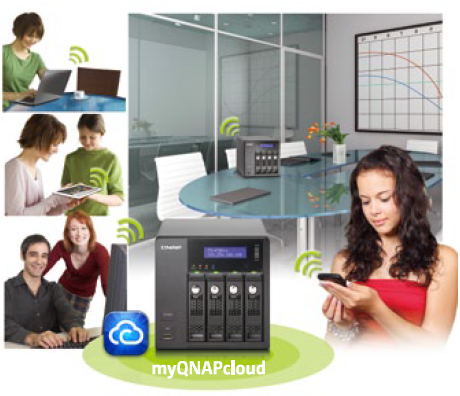
myQNAPcloud service
Create your own private cloud with the free myQNAPcloud service. The Turbo NAS creates your own unique URL and in a few easy steps, you will be able to access your files from any web browser.
VPN Server
The VPN server allows you to access the Turbo NAS on the same local network from the Internet and easily manage the files with drag-anddrop through the file browser.
CloudLink
CloudLink helps you pass through the complicated network environment and connect to the Turbo NAS from a remote PC and easily access the data from anywhere without complicated settings.
myQNAPcloud Connect
myQNAPcloud Connect is a Windows VPN connection utility. It can establish a secure VPN connection with the remote NAS over the Internet and enable you to access the NAS as if it were in your local network.
Dropbox-style Data Sync
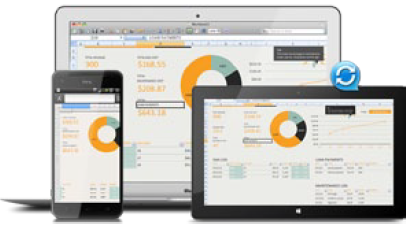
Qsync
Your Turbo NAS becomes a safe data center for file synchronization with huge storage. Qsync provides multiple ways of file synchronization and group file sharing, greatly enhancing the flexibility of collaboration. Whenever you add, edit, delete or rename a file on one computer, the change applies to all others linked with the Turbo NAS, so you have identical data on all your devices.
Use space effectively
Remove the files on one computer without affecting the files stored on other devices linked with the Turbo NAS. Even when someone updates the same files from another computer, Qsync will ensure that you will always have the latest files. When synchronizing files, you can choose to only sync specific subfolders within the Qsync folder.
Share team folders with different groups of people
Create subfolders within the Qsync folder, and share each with different groups of Turbo NAS users as a file exchange center. Everyone in the same subfolder is always kept up-to-date with the latest version of the files.
Quickly share files with download links
You can create download links to share files with others. This greatly reduces the time in creating user account and password for users just to share less-important documents.
Storage for Virtualization
The QNAP Business Series Turbo NAS is a virtualization-aware storage solution which supports VMware vSphere, Microsoft Hyper-V, and Citrix XenServer. QNAP vSphere plug-in and QNAP SMI-S provider highly increase the productivity and efficiency.
Datastore for VMware
- VAAI for iSCSI, VAAI for NAS
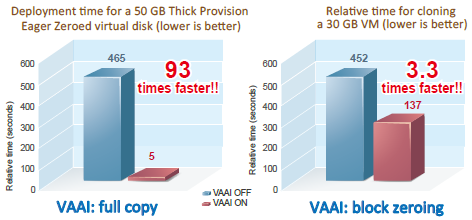
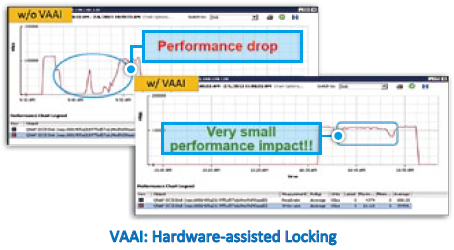
VMware vStorage APIs Integration (VAAI) is a set of APIs that allow ESXi hosts to offload processing for certain storage-related services to storage systems. The integration of QNAP NAS with VMware VAAI offers optimal performance for customers to deploy a virtualization environment.
The QNAP NAS, VAAI iSCSI and VAAI NAS are VMware certified. Businesses can either select iSCSI or NFS as a centralized storage to boost performance. VAAI for iSCSI supports Full Copy (hardware-assisted copy), Block Zeroing (hardware-assisted zeroing), Hardware-assisted Locking, and Thin Provisioning with space reclaim. VAAI for NAS supports Full File Clone, Extended Statistics, and Reserve Space.
The QNAP NAS uniquely supports VAAI iSCSI and VAAI NAS to enhance storage performance in a virtualized environment.
- Enhanced Performance by VAAI
- vSphere Plug-in
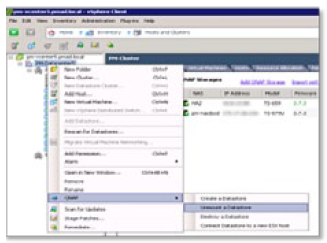
The vSphere plug-in allows users to manage the QNAP Turbo NAS directly on the vSphere client, making datastore management more effective.
Storage for Microsoft Hyper-V
- ODX (Offloaded Data Transfer)
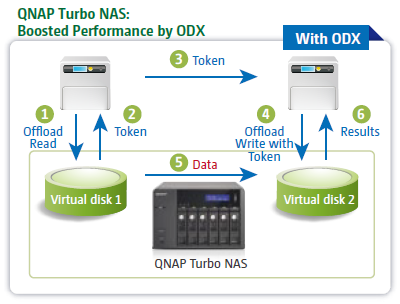
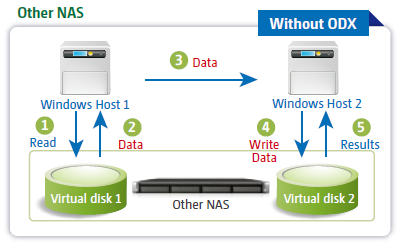
With ODX support, the QNAP Turbo NAS becomes a high performance iSCSI storage solution under Windows Server 2012, including Hyper-V virtualized environment. QNAP storage enables full copies of virtual machines within the NAS without requiring the Windows hosts to read and write the data. This highly reduces the loading of Windows hosts and improves the performance of copy and move operations for Windows 2012 hosts using the QNAP iSCSI storage. When providing QNAP storage to a Windows 2012 file server, the end user using Windows 8 client workstation will also benefit from the Offloaded copy process for large file transfers.
- NAS Management via SCVMM
The QNAP SMI-S provider enables management of the QNAP Turbo NAS directly through Microsoft System Center Virtual Machine Manager 2012 (SCVMM).
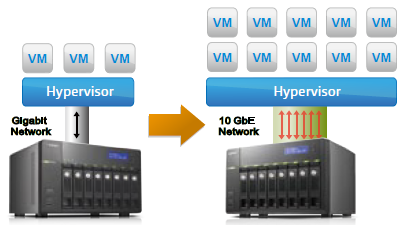
10 Gigabit Ethernet Storage Solution for the Virtualized Data Center
The QNAP TS-x70 Series Turbo NAS supports an optional 10GbE adaptor, including SFP+ and 10G Base-T interface. The 10Gb speed increases the agility of data transmission in a virtualized environment, intensifying NFS and iSCSI connection performance, and enables more VMs with multiple transactions running concurrently without performance penalty.
Proactive Data Protection
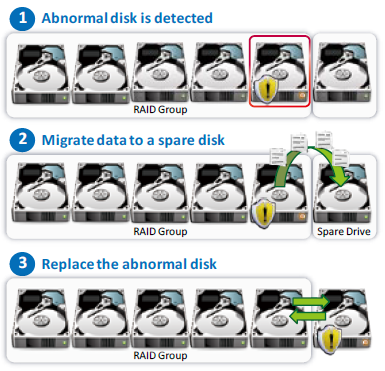
QNAP SMART Data Migration
The data stored on the Turbo NAS is constantly monitored to reduce potential data loss and rebuilding time. If the Turbo NAS detects a possible drive failure or abnormal health status, the data will be proactively migrated to a new spare drive. This ensures valuable business assets are well stored and protected.
Supports TLER and ERC
TLER (Time-Limited Error Recovery) and ERC (Error Recovery Control) are now supported with compatible hard drives, improving drive error handling in RAID applications. This latter prevents the hard drives from prematurely failing out of RAID arrays, forcing rebuilds, and RAID volume loss. The data will be retrieved more quickly when a hard drive takes too long to respond from bad blocks.
RAID Read Error Recovery
When read errors are detected in the hard drive blocks, they are automatically corrected with healthy ones. The bad block recovery will run in the background and ensure data is well stored in the hard drives.
RAID Hot-spare and Global Hot-spare Drives
A hot spare drive can be configured so that if a hard drive in a specific RAID group fails, the hot spare drive will operate automatically. Moreover, the QNAP storage also supports global hot spare drives which allow the administrator to share the spare drives efficiently among multiple RAID Groups.
| Abundant Business Features |
| The Turbo NAS supports abundant server applications. |
 |
Web Server
Multiple websites can be hosted on the Turbo NAS with the built-in web server and virtual host feature. |
 |
Syslog Server
By collecting and storing the logs of other network devices on the Turbo NAS with the Syslog server support, the IT administrator can monitor the status of these devices and collect the information necessary for further troubleshooting. |
 |
RADIUS Server
The RADIUS server centralizes and consolidates user authentication by maintaining a list of user accounts that are authorized for remote network access through dial-up equipment, Wi-Fi access point, or VPN connections. |
 |
Proxy Server
With the help of the Squid App add-on, the QNAP Turbo NAS can be used as a Proxy Server. |
HIPAA Compliant Storage Solution
While medical data (e.g ePHI) constantly increases, IT administrators are required to develop a strategy of strong storage platforms within their medical organizations. QNAP meets the electronic requirements of HIPAA for storing PHI data by providing a base to protect the confidentiality and security of “individually identifiable health information”. QNAP provides a full range and variety of storage models that can easily fit into different scales of deployment. Choose based upon capacity, performance, and price range to meet the need of any type of medical environment.
| Secure Measures for Data Storage and Access |
Policy-based Unauthorized IP Blocking
Users can allow, deny or auto block specified IP addresses or network domains which attempt to connect to the Turbo NAS via SSH, Telnet, HTTP(S), FTP, Samba, or AFP. |
Remote Login
The Turbo NAS supports remote login by SSH (secure shell) or Telnet connection. |
SSL Security (HTTPS)
The Turbo NAS supports HTTPS. Users can upload a secure certificate and RSA private key in X.509PEM format issued by a trusted provider to allow access the Turbo NAS by secure SSL login. |
Secure FTP
The Turbo NAS offers secure data transfer with SSL/TLS (explicit) encryption. Passive FTP port range setup is also supported. |
Encrypted Remote Replication by Rsync
The data on the Turbo NAS can be backed up to or from another Turbo NAS or rsync server over the network securely. |
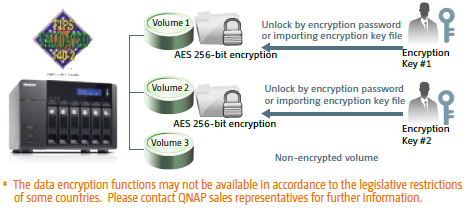
FIPS 140-2 Validated AES 256-bit Volume-based Data Encryption
The disk volume with FIPS 140-2 validated AES 256-bit encryption can only be accessed by an authorized encryption password or key. This prevents sensitive data on the Turbo NAS from unauthorized access, even if the hard disk drives or the entire system were stolen.
 |
Advanced Folder Permissions
Advanced folder permissions allow users to configure folder/subfolder access to the Turbo NAS. With this feature enabled, users can manage the folder permissions from Microsoft Windows or the web-based management interface of the Turbo NAS without complicated procedures. |
Antivirus
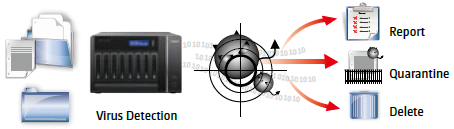
The integrated antivirus solution for the Turbo NAS ensures business continuity by offering detection against the latest viruses, malware, worms, and Trojan horses with continuous free virus database updates.
 |
QNAP Flexible Volume
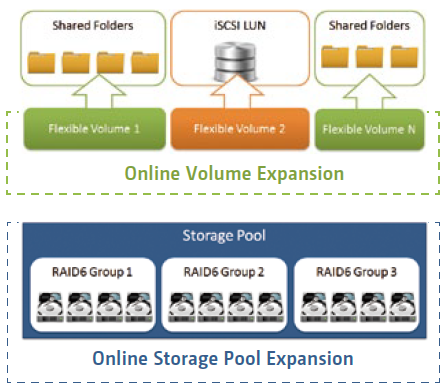
QNAP Flexible Volume provides a more secure and flexible way to store and manage the NAS data. This next generation volume offers powerful features such as storage pooling with multiple RAID, thin-provisioned volume with space reclaim, and online capacity expansion.
Block-based iSCSI LUN
In addition to storing data, the QNAP Flexible Volume can be utilized as an iSCSI LUN at the same time. The block-based iSCSI LUN provides less overhead which improves the overall read/write performance. The blockbased iSCSI LUN takes advantage of Flexible Volume features such as thin provisioning LUN with Space Reclaim and online capacity expansion.
Online Capacity Expansion
Increase the capacity size of the LUNs, volumes, and storage pools on the fly. The Turbo NAS allows you to add more hard drives to increase the storage capacity of the storage pool on demand. The LUN and volumes can also be expanded online without interrupting the services.
Thin-provisioned Volume
Pre-allocate storage to give the appearance of having more capacity than actually available. This allows you to consume storage on demand as data is written to disk, instead of having capacity ahead of time.
Space Reclaim
Space reclaim complements thin provisioning so storage can be recovered and used for other NAS applications. Normally when data is deleted in a volume the storage capacity cannot be transferred back to the overall storage pool. But with space reclaim, space can be recovered and allocated back to the overall storage pool. This provides a much more efficient space usage.
Alert for Volume/LUN Threshold
An alert can be created once a LUN or volume reaches a particular threshold size with email and SMS notifications. This prevents the storage or volume from running out of space, and the administrator can add more storage space or expand an existing volume if necessary.
App Center
Powerful, organized, rich-in-content
The new App Center makes it easy to find and install all sorts of apps and also acts as a central platform to manage and update your installed apps.

Mobility and Remote Access
Qfile
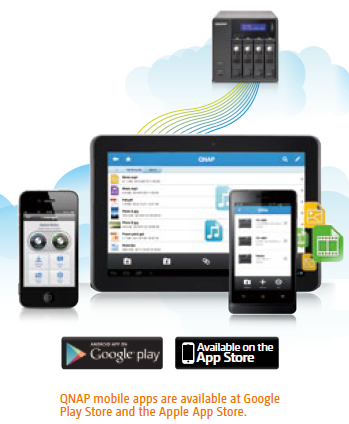
You can manage as many Turbo NAS units as you want with Qfile and conveniently connect to any of them on the login page. Enabling the auto-upload function will let your pictures and photo albums automatically sync to your Turbo NAS and works as a real-time backup of your precious photos. Qfile displays a thumbnail list view for you to easily identify the file type at a glance. You can move, copy, rename or delete files on the Turbo NAS, all with your mobile device.
Qmanager
Qmanager lets you monitor the CPU usage, memory usage, system event info, and active users. You can also remotely check the connection status or logged in users to prevent unauthorized access. Remotely restart or shut down your Turbo NAS, and use Qmanager to turn the application services on and off. You can use Wake on LAN to power on your NAS. It only takes a single click and you are done!
Surveillance
Surveillance Station Pro
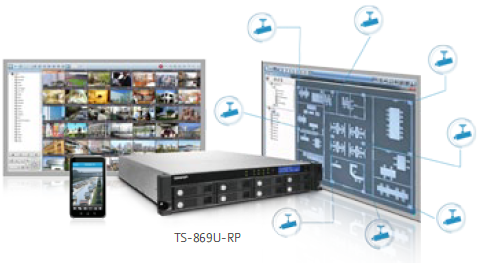
The Surveillance Station Pro allows users to easily set up a home security system and flexibly choose the IP cameras for live view monitoring, recording, and playback. The live view provides instant video images from the monitored areas. Event notifications and fast video retrieval are also offered. iOS® or Android™ users can install the VMobile app to monitor the surveillance channels anytime and anywhere.
Specifications:

| CPU |
Intel Celeron 2.41GHz dual-core processor (burst up to 2.58GHz) |
| Memory |
TS-251C-4G: 4GB DDR3L RAM (2GB x 2)
TS-251C: 1GB DDR3L RAM
Total memory slots: 2 (expandable up to 8GB) |
| Flash Memory |
512MB DOM |
| Hard Drive |
2 x 3.5” or 2.5” SATA 6Gb/s, SATA 3Gb/s hard drive or SSD |
| Hard Drive Tray |
2 x Hot-swappable tray |
| LAN Port |
2 x Gigabit RJ-45 Ethernet port |
| LED Indicators |
Status, LAN, USB, HDD 1-2 |
| USB |
2 x USB 3.0 port (Front: 1, Rear: 1)
2 x USB 2.0 port (Rear: 2)
Support USB printer, pen drive, and USB UPS etc. |
| HDMI |
1 |
| Buttons |
Power/Status, USB One-Touch-Backup, reset |
| Alarm Buzzer |
System warning |
| IR Receiver |
MCE-compatible |
| Form Factor |
Tower |
| Dimensions |
168.5(H) x 102(W) x 225(D) mm
6.63(H) x 4.02(W) x 8.86(D) inch |
| Weight |
Net: 1.28 kg (2.82 lbs)
Gross: 2.32 kg (5.11 lbs) |
| Power Consumption (W) |
HDD standby: 10.28W
S3 sleep: 0.47W
In operation: 19.22W
(with 2 x 1TB HDD installed) |
| Temperature |
0-40˚C |
| Relative Humidity |
5~95% non-condensing, wet bulb: 27˚C |
| Power Supply |
External Power Adapter, 90W, 100-240V |
| Secure Design |
Kensington security slot for theft prevention |
| Fan |
1 x quiet cooling fan (7 cm, 12V DC) |
| Package Contents |
- TS-251C
- Ethernet cable x 1
- Power cord
- Screw pack
- SATA power cable x 1
- Quick Installation Guide
- SATA cable x 1
- Adaptor
|
Software Specifications:
| Operating System
Supported Clients
- Windows XP and Windows Server 2003 onward
- Apple Mac OS X onward
- Linux & UNIX
Supported Browsers
- Google Chrome
- Microsoft Internet Explorer 10+
- Mozilla Firefox
- Apple Safari
Multilingual Support
- Chinese (Traditional & Simplified), Czech, Danish, Dutch, English, Finnish, French, German, Greek, Hungarian, Italian, Japanese, Korean, Norwegian, Polish, Portuguese (Brazil), Romanian, Russian, Spanish, Swedish, Thai, Turkish
File System
- Internal Hard Drive: EXT4
- External Hard Drive: EXT3, EXT4, NTFS, FAT32, HFS+
Networking
- TCP/IP: IPv4 & IPv61
- Dual Gigabit NICs with jumbo frame (failover, multi-IP settings, port trunking/NIC teaming )
- Service Binding based on Network Interfaces
- Proxy client, proxy server
- DHCP client, DHCP server
- NTP server
- Protocols: CIFS/SMB, AFP (v3.3), NFS(v3), FTP, FTPS, SFTP, TFTP, HTTP(S), Telnet, SSH, iSCSI, SNMP, SMTP, and SMSC
- UPnP & Bonjour Discovery
- USB Wi-Fi Adapter Support
Security
- Network access protection with auto-blocking: SSH, Telnet, HTTP(S), FTP, CIFS/SMB, AFP
- CIFS host access control for shared folders
- FIPS 140-2 validated AES 256-bit volume-based data encryption*
- AES 256-bit external drive encryption*
- Importable SSL certificate
- Instant alert via E-mail, SMS, beep, and LCD pane*
Storage Management
- Online Volume Expansion
- Single Disk, JBOD, RAID 0, 1
- Online RAID Capacity Expansion***
- Online RAID Level Migration
- Storage expansion via QNAP UX-500P / UX-800P expansion unit (Max: 1 unit)
- Bad block scan and hard drive S.M.A.R.T.
- Bad block recovery
- RAID recovery
- Bitmap support
Power Management
- Wake on LAN
- Internal hard drive standby mode
- Scheduled power on/off
- Automatic power on after power recovery
- USB and network UPS support with SNMP management
- System sleep mode (S3)**
Access Right Management
- Batch users creation
- Import/export users
- User quota management
- Local user access control for CIFS, AFP, FTP, and WebDAV
- Application access control for Photo Station, Music Station, Video Station, and Multimedia Station
- Subfolder permissions support for CIFS/SMB, AFP, FTP, and File Station
myQNAPcloud Service
- Private cloud storage and sharing with myQNAPcloud id (qid)
- Free host name registration (DDNS)
- Auto router (via UPnP) configuration
- Web-based file manager with HTTPS 2048-bit encryption
- Cloudlink for remote access without complicated router setup
- myQNAPcloud connect for easy VPN connection (Windows VPN utility)
Qsync
- Syncs files among multiple devices with SSL support
- Selective synchronization for syncing specific folders only
- Share team folder as a file center for team collaboration
- Shares files by links via e-mail
- Policy settings for conflicted files and file type filter support
- Version control: up to 64 versions.
- Incremental synchronization for HDD space saving
- Supports Windows & Mac OS
Web Administration
- Multi-window, multi-tasking based system management
- Personalized desktop
- Smart toolbar and dashboard for neat display on system status
- Login screen with personalized photo-wall style
- Smart fan control
- Dynamic DNS (DDNS)
- SNMP (v2 & v3)
- Resource monitor
- Network recycle bin for file deletion via CIFS/SMB, AFP and File Station
- Automatic cleanup
- File type filter
- Comprehensive logs (events & connection)
- Syslog client/server
- System settings backup and restore
- Restore to factory default
- Mobile app: Qmanager for remote system monitoring & management
FTP Server
- File Sharing across Windows, Mac, and Linux/UNIX
- Windows ACL
- Advanced folder permission for CIFS/SMB, AFP, FTP
- Shared Folder Aggregation (CIFS/SMB)
FTP Server
- FTP over SSL/TLS (Explicit)
- FXP supported
- Passive ftp port range control
File Station
- Supports ISO Mounting (Up to 256 ISO Files)
- Support thumbnail display of multimedia files
- Supported share download link and upload link
- Drag-n-drop Files via Chrome and Firefox Browsers
- Photo, music, and video preview and playback with hardware accelerated transcoding
- File Compression (ZIP or 7z)
Transcode Management
- Transcode video files to 240p, 360p, 480p, 720p and 1080p resolution
- Automatic video transcoding for watched folders
- Hardware accelerated transcoding support
Backup Station
- Remote replication server (over rsync)
- Real-time remote replication (RTRR) to another QNAP NAS or FTP server
- Works as both RTRR server & client with bandwidth control
- Real-time & scheduled backup
- Encryption, compression, file filter, and transfer rate limitation
- Encrypted replication between QNAP NAS servers
- Desktop backup with QNAP NetBak Replicator for Windows
- Apple Time Machine backup support
- Data backup to multiple external storage devices
- Synchronizes with cloud storage: Amazon S3, ElephantDrive, Symform, Dropbox, and Google Drive
- Third party backup software support: Veeam backup & replication, Acronis True Image, Arcserve backup, emc retrospect, Symantec Backup Exec, etc.
|
Cloud Storage Backup
- Amazon S3
- Amazon Glacier
- Webdev-based cloud storage
- Microsoft Azure
- Open Stack
Print Server
- Max number of printers: 3
- Print job display and management
- IP-based and domain name-based privilege control
Photo Station
- Show photos in thumbnails, list, timeline, or folder view
- Supports virtual/smart album
- Validity control for sharing albums
- Tags photos with text, color, and rating
- Slideshows with background music and different transition effects
- Animated thumbnails for videos
- Geotags photos and display them on Google maps
- Shares slideshows link to social websites or through email
- Supports Facebook friends login
- Supports modification on photo taken date
Music Station
- Plays or shares music collections with web browser
- Automatic classification via Media Library
- Internet radio streaming (MP3)
- Up to 8 music alarms
- Mobile app: Qmusic for music playing and management
iTunes Server
- Audio and Video Sharing for Windows & Mac iTunes
Video Station
- Show photos in thumbnails, list, timeline, or folder view
- Supports virtual/smart collection
- Validity control for sharing collections
- Tags videos with text, color, and rating
- Animated thumbnails for videos
- Shares video collection link to social websites or through email
- Sorting videos automatically into defined classifications
- Display movie information from IMDB
DLNA Server
- Supports DLNA/UPnP TVs and players such as PlayStation 3 and Xbox 360
- Video and audio on-the-fly transcoding
AirPlay
- Streams videos, photos and music from NAS to Apple TV via Qfile or QAirPlay's web-based controller
Mobile App
- Qfile: iOS, Android Phone, window phone
- Qfile HD: iPad version
- Qmanager: iOS, Android Phone
- Qmusic: iOS, Android Phone
- Qremote: iOS, Android Phone
- Qget: Android Phone
- Vmobile: iOS, iPad, Android Phone
Download Station
- PC-less BT, FTP/FTPS, and HTTP/HTTPS download (up to 500 Tasks)
- BT download with Magnet Link and PT support
- Scheduled download and bandwidth control
- RSS subscription and download (broadcatching)
- Bulk download with wildcard settings
- BT search
- Proxy support for BT download
- PC utility: Qget for downloads browsing and management
- Mobile app: Qget for downloads browsing and management
HD Station
- Playbacks videos, music, photos on tv with xbmc via hdmi output
- Watch various online contents such as Youtube, Flickr, Picasa, Shoutcast, etc.
- Web browser
- Supports USB U.S. keyboard and mouse
- Supports QNAP Qremote app and the official XBMC remote app
Note:
The playback and quality of some video files may be affected due to the current CPU and GPU's decoding capability.
Up to 7.1 channel audio passthrough can be supported
Surveillance Station
- Supports over 2,100 ip cameras
- Includes 2 free camera licenses, up to 24 camera channels via additional license purchase
- Instant playback to check the recent event
- Online editing to edit cameras when live view
- Visual aid by e-map
- Playback and speed control by shuttle bar
- Video preview on playback timeline
- Intelligent video analytics (iva) for advanced video search
- Surveillance client for Mac
- Mobile surveillance app: vmobile (iOS and Android)
- Mobile recording app: vcam (iOS and Android)
Notes Station
- Take notes of everything on your private cloud
- Collaborate notes with multi users
- Support graphical editor for note editing
- Integrate with NAS file system: insert attachment or image from NAS file system
- Support event calendar and to-do list
- Support image editor: a easy way to highlight the focus in your image
- Support note publishing with a single link
- Support key word search
- Provide Chrome Extension: Notes Station Clipper
- Clip web page content to your note
VPN Server
- Secure remote access: PPTP & OpenVPN VPN services
- Max number of clients: 30
Domain Authentication Integration
- Microsoft Active Directory (AD)
- LDAP server, LDAP client
- Domain users login via CIFS/SMB, AFP, FTP, and File Station
App Center
- More than 100 official and community software add-ons (ex: Dropbox, Google Drive Sync, McAfee, WordPress, HappyGet II, etc.)
Virtualization Station
- Support one Virtual Machine (VM) creating to run an operating system such as Windows, Linux, Unix.
- VM import from Virtual Appliances
- VM export into a virtual appliance in OVF / QVM format
- VM clone
- VM snapshot
- HTML5 based shared remote console
Signage Station
- Support dynamic content includes video, image, music, and text message
- Support multi users collaboration
- Support searching keywords,
- Support email and social network sharing
- Support design software - iArtist Lite
- Support account authority management
- Support various browser playback ( Chrome, Firefox, IE, Safari)
- Support most viewed, latest released and different categories content list
|
(1). Not all services are supported.
*The data encryption functions may not available in accordance to the legislative restrictions of some countries.
Design and specifications are subject to change without notice.
Optional Accessories:
| Optional Accessories |

RM-IR002 |
IR Remote Control |
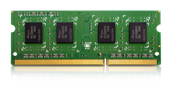
RAM-1GDR3L-SO-1600 |
1GB DDR3L RAM Module |
RAM-2GDR3L-SO-1600 |
2GB DDR3L RAM Module |
RAM-4GDR3L-SO-1600 |
4GB DDR3L RAM Module |
RAM-8GDR3L-SO-1600 |
8GB DDR3L RAM Module |
Utilities:
Various handy utilities are available for you to work smartly with your Turbo NAS. These utilities help increase your productivity and make it absolutely easy with connecting the Turbo NAS, setting up the system, data backup and synchronization, downloading files, and so on.
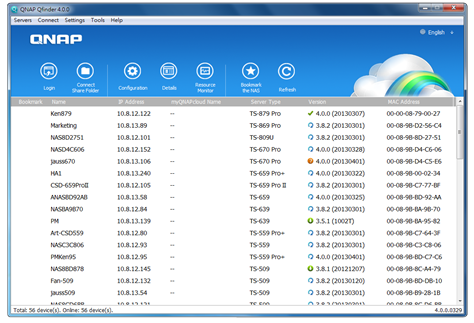
Qfinder
Connect and set up NAS easily
Qfinder is a utility, available for Windows, Mac, and Linux, to quickly find and access the Turbo NAS over the LAN. Install the Finder on your computer, open it, and double click your Turbo NAS name, and the login page is ready for you.
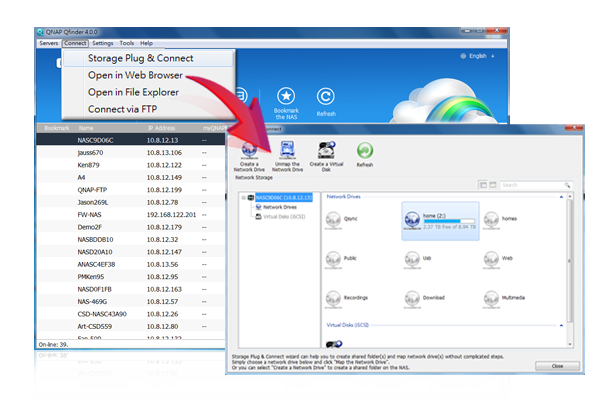
Easily access the NAS by Storage Plug & Connect
Windows version of Qfinder provides a convenient way to connect to the Turbo NAS and map a network drive or a virtual disk. By creating a shared folder on the Turbo NAS and mapping it as a network drive, you can use it as an additional drive and store files on it as it is a local drive of the computer.
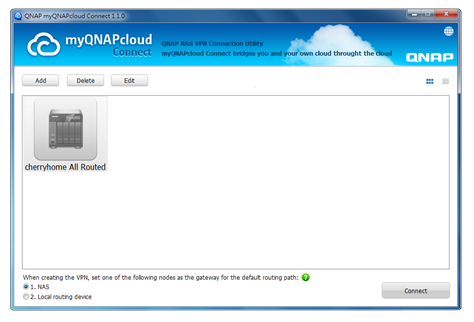
myQNAPcloud Connect
NAS Connection by VPN
myQNAPcloud Connect helps you access the published services of the Turbo NAS quickly and securely on the Internet. myQNAPcloud Connect application is designed for Windows PC users. By installing the myQNAPcloud Connect, you will be able to connect to the Turbo NAS and easily manage files by drag-and-drop within the Windows Explorer.
Qsync
Synchronize files anytime, anywhere
Qsync is a useful tool to synchronize files in multiple computers. It creates a specific “Qsync folder” in your devices that you can simply drop files in, and synchronizes the files to all your devices linked to the Turbo NAS.

Sync in multiple ways
Full Sync
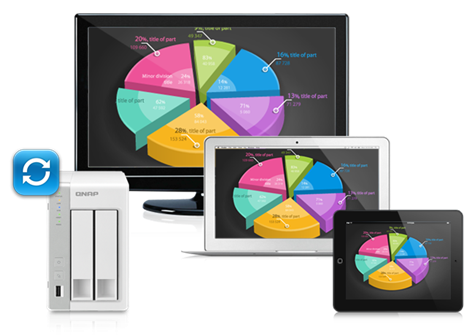
Whenever you add, edit, delete or rename a file on one computer, the change applies to all others linked with the Turbo NAS, so you have exactly identical contents on all your devices.

Smart Sync
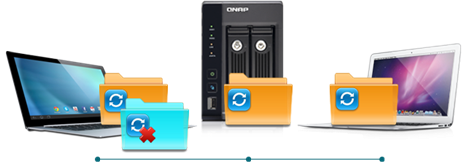
It allows you to remove files on one computer without affecting the copies stored on others that are linked with the Turbo NAS. However, when someone updates the files you deleted from another computer, you can still retrieve them in the Qsync folder.
Advanced Selective Sync
With both Full Sync or Smart Sync options, you can choose to only sync specific sub-folders within the Qsync folder, useful if your computers have limited storage.
 Share files and folders easily
Quickly share files with download links
You can create download links to share files with people, even if they don’t have an account on the Turbo NAS. This greatly reduces the time in creating user account and password for users.
Share folders for collaboration
Your life is connected with different groups of people. You can create sub-folders within the Qsync folder, and share each with different groups of Turbo NAS users as a file exchange center. Everyone in the same sub-folder is always kept up-to-date with the latest version of the files.
 QNAP NetBak Replicator
Backup data on PC
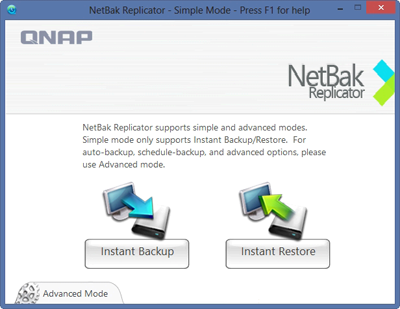
The QNAP NetBak Replicator, provided with any Turbo NAS unit free of charge, helps you easily back up files from Windows PC - entire disk drives, documents, pictures, music, videos, fonts, emails, and more - to the Turbo NAS. The operation is very simple. You can do the backup task in just a few clicks using NetBak Replicator by the setting of real-time synchronization, scheduled backup and auto-backup from multiple PCs to the Turbo NAS.
NetBak Replicator also supports backing up to a remote server via FTP and WebDAV through the Internet. Imagine that you can backup new photos whenever on vacation. Even you are away from home, the convenient backup supports your memories.
 QGet
QGet
Download Station monitor widget
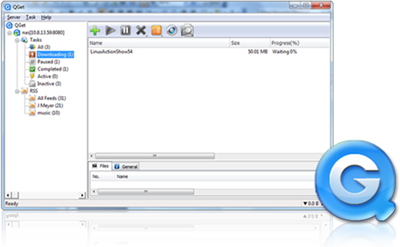
QGet is a powerful utility for download management. The software is available for Windows and Mac computers, allowing the management of BT, HTTP, and FTP download tasks of Download Station on multiple Turbo NAS servers.
QGet enables you to add, remove, or watch your BT download jobs from LAN or WAN. You can manage your download tasks in school or at work. QGet supports intuitive drag and drop of torrent files, HTTP or FTP URL to the software interface for convenient adding of download tasks.
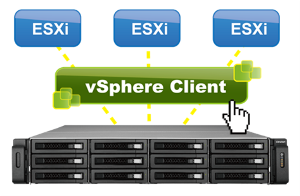 vsphere Client plug-in
Manage QNAP NAS within vSphere Client
The Turbo NAS supports vSphere Client Plug-in that allows managing VMware datastores on the Turbo NAS directly from the vSphere client console. In a large-scale server virtualization environment, management is centralized and straightforward. Administrators can easily control the status of the Turbo NAS and datastores and create additional datastores to multiple ESXi hosts in just a few clicks.
Note: The TS-x51 series doesn’t support vSphere Client plug-in.

|
Qsnap
Take screenshots, easy and fast
Qsnap is a handy utility assisting you to quickly capture screenshots on your PC, and easily edit, save, and share, enabling quick note-taking or productive communication in your work and life.
- Hotkey capturing: Taking PC screenshots without complicated mouse operations.
- Easy editing: Add emphasis or remove unnecessary elements with a range of editing tools.
- Instant sharing: Simply drag and drop the screenshots to instant messengers and emails as attachments to share.
|
Documentation:
Download the QNAP TS-251C Series Datasheet (PDF).