QNAP Features: Backup
A reliable backup solution with large storage capacity and impressive file transfer speeds
Every day, huge amount of data is produced and stored on computers and servers. It is imaginable that the loss of business data can be catastrophic. As the accident of data loss is unexpected, a good backup solution that safeguards the important data and reserves the copy for data recovery if the data loss does happen is rather essential for businesses.
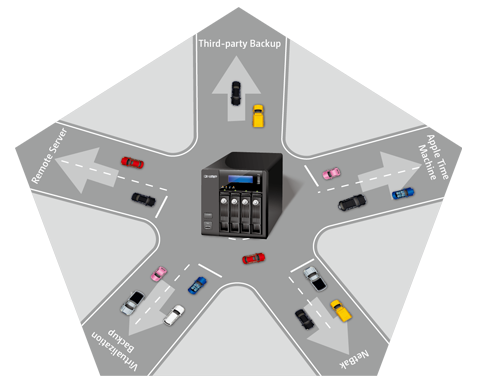
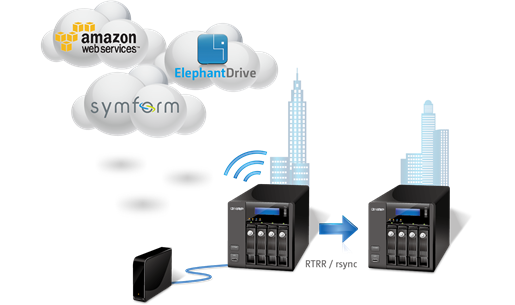
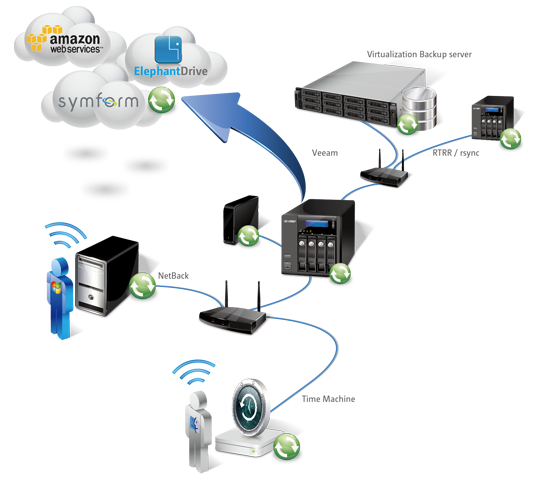
QNAP Turbo NAS performs as an ideal backup center, with large storage capacity and excellent file transfer speed to greatly assist businesses on efficient backup tasks. In addition to being a backup center, the Turbo NAS can also have its data backed up to external storage devices, remote servers, and third-party cloud backup services easily and conveniently.
An Inclusive Backup Center:
- Free PC backup utility for Windows users
- Apple Time Machine support
- Third-party backup software support
- Virtualization backup server
- Back up from a remote servers via RTRR
Free PC backup utility for Windows users
The QNAP NetBak Replicator, a license-free backup utility provided with any Turbo NAS unit to execute data backup on Windows OS, helps users back up files from Windows PC - entire disk drives, documents, pictures, music, videos, fonts, emails, and more - to one or multiple Turbo NAS units on the network. Besides, NetBak Replicator also supports backing up to a remote server via FTP and WebDAV. The operation is very simple, and the data backup can be done in just a few clicks by the settings of real-time synchronization, scheduled backup and auto-backup.
Apple Time Machine support
The Turbo NAS supports Apple Time Machine and provides Mac OS X users with an effortless solution to back up data to the Turbo NAS. This greatly saves cost of purchasing an external hard drive for every Mac user in order to back up their data. Besides, configurable storage quota for backup jobs is allowed so that IT administrators can arrange a certain amount of capacity dedicated for Mac data backup.
Compatible with third-party backup software
The Turbo NAS is compatible with various renowned backup software on the market, such as Acronis® True Image, CA® ARCserve Backup, Retrospect®, Symantec® Backup Exec, LaCie® SilverKeeper and so on. Companies that have already adopted such backup software can immediately leverage the large storage capacity found in the Turbo NAS to back up data from other sources on the network.
Reliable virtualization backup server
Many businesses have deployed virtualization in the IT environment. Besides the primary storage, a reliable backup storage is also indispensible. The Turbo NAS is virtualization-ready and is compatible with VMware® ESX server, Citrix® XenServer, and Microsoft® Hyper-V, able to be seamlessly integrated to a virtualized environment as an extended storage for data backup. For example, businesses can use compatible third-party backup software, such as Veeam, specialized in the virtualization environment for backup tasks to the Turbo NAS.
Back up from a remote server via RTRR or rsync
QNAP’s RTRR (Real-Time Remote Replication) service allows real time or scheduled data backup from a remote Turbo NAS or FTP server via RTRR, synchronizing files from a remote folder to a local folder with better backup efficiency and reduced backup time. Besides, a standard rsync server on scheduling basis via rsync protocol is also supported to allow data backup tasks from another remote server.